
How to set up Bukkit?

To set bukkit up, follow these steps;
 
  1. Go to your server in the Multicraft control panel.
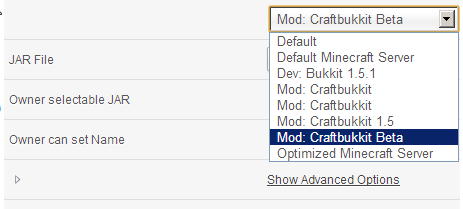
  2. Click under your server, and it'll have Default in a dropdown box, choose Either one of the many Bukkits provided. They are sorted out by names (1.5.1 Bukkit Dev, etc.) 
  3. Restart your server, and you're good to go!
Hjälpte svaret dig?

 Skriv ut denna artikeln

Läs även

How do I install Bukkit Plugins?

To install bukkit plugins, follow these very simple steps. Log into Multicraft Open up your...

How do I do "Permissions"?

Permissions is a plugin that allows you, to set a player(s), or the group(s) permissions. By...

How do I keep my servers safe from 'Hackers' and 'Griefers'?

If your server is a private server, and has been trashed by people you don't even know, turn...

How do I add a new user for Multicraft?

To add a new user to your Multicraft account, you firstly must have the person sign up to the...

How do I download my world?

To download your world, follow these simples steps. Log into FTP using Filezilla. If you don't...

Powered by WHMCompleteSolution